
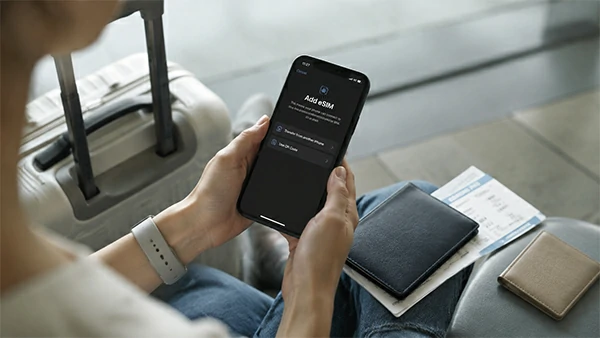
Does eSIM Work in China? Setup, VPN and Mobile Data Guide
Does eSIM work in China? For most international visitors, the practical answer is yes—provided your phone supports eSIM, is carrier-unlocked, and the plan specifically covers mainland China.
A travel eSIM can give you mobile data as soon as you land, without visiting a phone shop or removing your regular SIM. That convenience matters in China, where you may need an internet connection before you even reach your hotel—to check a Chinese address, message a driver, translate a sign, open a booking, or use a payment app.
The part that catches travelers out is usually not the eSIM itself. It is the small print: activation timing, roaming settings, data routing, hotspot rules, and whether the plan includes a phone number.
This guide explains what to check before buying a China eSIM, how to set it up, whether you may need a VPN, and what to do if your phone shows a signal but has no internet.
In This Guide
- Quick Answer: Does eSIM Work in China?
- What a China Travel eSIM Actually Provides
- What to Check Before Buying a China eSIM
- Do You Need a VPN With a China eSIM?
- How to Choose the Right China eSIM Plan
- How to Install an eSIM Before Departure
- Phone Settings After You Arrive in China
- Calls, SMS and Verification Codes
- China eSIM vs Physical SIM vs International Roaming
- Common China eSIM Problems and Fixes
- Frequently Asked Questions
- Final China eSIM Checklist
Quick Answer: Does eSIM Work in China?
Yes. Many international travel eSIMs work in mainland China by connecting to a local partner network. You buy the plan online, install the digital SIM profile on a compatible phone, and select it as your mobile-data line after arrival.
Before paying, check five things:
- Your exact phone model supports eSIM.
- The phone is unlocked from its original carrier.
- Mainland China appears in the coverage list.
- You know when the validity period begins.
- You understand whether the plan is data-only.
Do not buy a plan simply because the product page says “China coverage.” That does not tell you whether hotspot use is allowed, whether international apps are accessible, or whether you will receive a Chinese phone number.
What a China Travel eSIM Actually Provides
An international travel eSIM is usually a roaming data product. It is not the same as opening a local mobile account with a mainland Chinese carrier.
Most short-stay plans provide data only. You can use that data for maps, translation, messaging, ride-hailing, email, ticket bookings, payment apps, and internet calls.
However, a data-only plan normally does not include:
- A mainland Chinese phone number
- Standard voice minutes
- Normal SMS service
- Guaranteed verification codes
You may therefore have fast mobile data but still be unable to receive a local delivery call or complete a registration that requires a +86 phone number.
Local carrier eSIM rules are a separate issue. Apple’s guidance says mainland China eSIM activation can depend on the iPhone model, purchase region, and carrier. Check your exact device and your travel provider’s compatibility list rather than relying only on the phone’s series name. You can also review Apple’s mainland China eSIM information.
What to Check Before Buying a China eSIM
Check Your Exact Phone Model
Regional versions of the same phone may use different SIM hardware. Do not assume that every phone in the same product series supports eSIM.
Open your phone settings and look for an option such as:
- Add eSIM
- Add Mobile Plan
- Set Up an eSIM
On an iPhone, check:
Settings → Cellular or Mobile Service
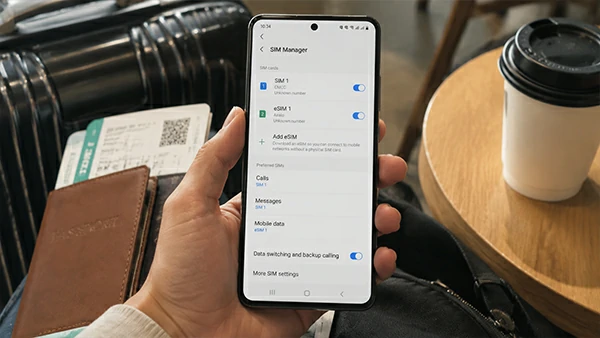
On Android, look under:
Network & Internet, Connections, or SIM Manager
eSIM and dual-SIM functions can vary by device model, purchase region, and mobile operator. Google provides additional guidance for supported Pixel phones.
Confirm That the Phone Is Unlocked
A phone may support eSIM but still be locked to its original carrier. In that case, it may reject a travel plan.
On an iPhone, check:
Settings → General → About → Carrier Lock
An unlocked device should display:
No SIM restrictions
Only the original carrier can remove its network lock, so check this before purchasing your plan. The travel eSIM provider cannot unlock the phone for you.
Read the Coverage List Carefully
Mainland China, Hong Kong, Macao, and Taiwan may be listed as separate destinations.
A Hong Kong plan is not automatically a mainland China plan. An “Asia” package may also include some destinations while excluding others.
Check:
- Whether mainland China is explicitly included
- Which local network the eSIM uses
- Whether the plan covers every destination on your route
- Whether coverage outside major cities is mentioned
Check Activation and Validity Rules
Some plans begin when they first connect to a supported network. Others start when you install the eSIM, activate it, or reach a date selected during checkout.
Read the instructions before scanning the QR code. Installing the eSIM too early could start the validity period before your trip.
Save the QR code and manual activation details in a secure offline location. Some eSIM profiles can be installed only once, so deleting the profile during troubleshooting may create a bigger problem.
Check Data and Hotspot Limits
Do not compare plans only by the word “unlimited.” Look for the actual conditions attached to the offer.
- Total high-speed data
- Daily high-speed limits
- Reduced-speed rules
- Fair-use policies
- Hotspot or tethering restrictions
- Top-up availability
Hotspot support is especially important when you need to connect a laptop or share your connection with another traveler.
Do You Need a VPN With a China eSIM?
The honest answer is that it depends on how the provider routes your data.
Some international travel eSIMs route traffic outside mainland China. Others may behave more like an ordinary local mobile connection. That difference can affect access to international websites and apps.
A number of overseas online services are restricted on ordinary mainland China connections, so you should not assume that every China eSIM provides the same internet experience. Government travel guidance also advises visitors to understand local rules concerning online services and VPN use.
Before buying, check:
- Does the provider explain its data routing?
- Does it mention access to the apps you need?
- Does it say whether a separate VPN is required?
- Are any websites or services excluded?
- Can customer support answer questions about the exact mainland China plan?
Avoid relying on a general claim that applies to every destination. The information should refer specifically to the mainland China package you are considering.
Prepare essential apps and documents before departure. Save your hotel information, Chinese addresses, booking confirmations, eSIM instructions, and customer-support details offline.
How to Choose the Right China eSIM Plan
Choose a plan around how you will actually use your phone rather than simply buying the largest data package.
Light use may include:
- Maps
- Messages
- Translation
- Payment apps
- Basic searches
Moderate use may add:
- Ride-hailing
- Photo uploads
- Social media
- Ticket bookings
- Frequent navigation
Heavy use may include:
- Video calls
- Streaming
- Cloud backup
- Laptop hotspot use
When comparing plans, look at:
- Mainland China coverage
- Validity period
- High-speed data allowance
- Daily caps or throttling
- 4G or 5G availability
- Hotspot permission
- Local network partners
- Top-up options
- Support and refund policy
A clearly explained 10 GB package may be more useful than an “unlimited” plan that slows down after a small daily allowance. The headline number matters less than the conditions attached to it.
How to Install an eSIM Before Departure
Install your eSIM while you still have reliable Wi-Fi and enough time to contact support. First, confirm that installation will not start the plan too early.
Installing an eSIM on an iPhone
The usual process is:
- Open Settings.
- Tap Cellular or Mobile Service.
- Tap Add eSIM.
- Scan the QR code or open the provider’s app.
- Label the new line China Travel.
- Follow the provider’s activation instructions.
Apple supports several installation methods, including QR codes, provider apps, and manual activation, depending on the carrier and plan. See Apple’s international eSIM guidance for additional details.
Installing an eSIM on Android
The general route is usually:
Settings → Network & Internet or Connections → SIMs or SIM Manager → Add eSIM
The exact wording varies by phone brand and software version. Google’s Pixel instructions, for example, place the setup option under the SIM settings.
After installation, take screenshots of:
- The plan name
- Activation instructions
- APN details
- Validity rules
- Customer-support contact
Do not delete the profile simply because it does not connect before your trip. Many travel plans register only after the phone reaches a covered destination.
Phone Settings After You Arrive in China
After landing, turn on the travel eSIM and select it for:
Mobile Data
Many travel eSIMs require data roaming because they connect through a partner network. Enable it for the travel eSIM when the provider instructs you to do so.
For your home SIM:
- Keep it active when you need calls or verification messages.
- Turn off its data roaming unless you intend to use home-carrier roaming.
- Turn off automatic mobile-data switching.
If the travel eSIM has a signal but no internet, try these steps in order:
- Confirm that the travel eSIM is selected for mobile data.
- Enable data roaming on that line if required.
- Turn airplane mode on for about 20 seconds, then turn it off.
- Restart the phone.
- Check the APN supplied by the provider.
- Confirm that the plan is active and has data remaining.
- Try automatic network selection.
- Contact customer support before deleting the eSIM.
Do not copy APN settings from an unrelated provider. A setting that works for another plan may prevent your own eSIM from connecting.
Calls, SMS and Verification Codes
A data-only eSIM keeps you online, but it does not replace every function of your normal phone number.
Keeping your home SIM active may help you receive:
- Bank verification codes
- Airline or hotel messages
- Account sign-in codes
- Password-reset texts
- Calls to your usual number
Receiving calls or SMS abroad may involve roaming charges, so check with your home carrier before departure.
Supported dual-SIM phones can often use a travel eSIM for data while keeping the regular line available for calls or messages.
Some local services, delivery contacts, or registration processes may require a Chinese phone number. A standard travel eSIM usually does not provide one unless the product description explicitly includes a +86 number.
China eSIM vs Physical SIM vs International Roaming
| Option | Best for | Main advantage | Main limitation |
|---|---|---|---|
| Travel eSIM | Most short trips | Buy and install before arrival | Often data-only |
| Physical Chinese SIM | Longer stays or local-number needs | May include a +86 number | Requires local setup |
| Home-carrier roaming | Very short trips | Keeps your normal number | May cost more |
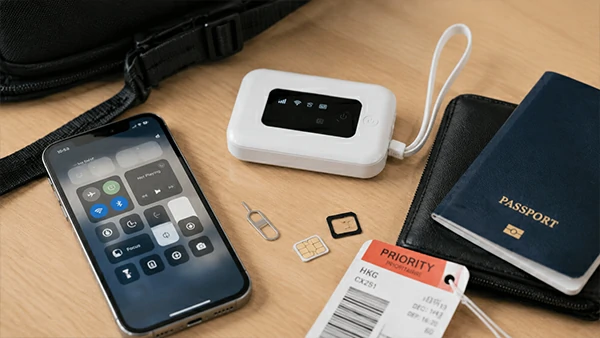
| Pocket Wi-Fi | Families or several devices | Shares one connection | Extra device to carry and charge |
For a short first trip, a travel eSIM is often the simplest option.
For a longer stay, or when a Chinese phone number is important, a physical SIM may be more practical.
International roaming is convenient because it requires less setup, but compare the actual price and data allowance instead of assuming it is automatically the best or worst choice.
Common China eSIM Problems and Fixes
The eSIM Will Not Install
Check device support, carrier lock, Wi-Fi quality, and whether the QR code has already been used.
The Phone Shows No Service
Confirm that:
- The eSIM line is switched on.
- Mainland China is included in the plan.
- The activation period has started.
- Automatic network selection is enabled.
Restart the phone after checking these settings.
There Is a Signal but No Internet
Check:
- The selected mobile-data line
- Data roaming
- APN details
- Activation status
- Remaining data allowance
The Connection Is Slow
You may have reached the high-speed allowance or connected to a congested network. Review the fair-use policy before assuming that the eSIM is faulty.
Your Home SIM Is Using Data
Disable automatic mobile-data switching and turn off data roaming on your home line.
International Apps Do Not Open
This may relate to the plan’s data routing rather than a broken eSIM. Check the provider’s mainland China access information and ask about the specific app you need.
Frequently Asked Questions
Should I Install My China eSIM Before I Fly?
Usually, yes. It is easier to solve installation problems while you still have reliable Wi-Fi. Check whether installation starts the validity period before scanning the QR code.
Can I Buy an eSIM After Arriving in China?
Usually, but you will need working Wi-Fi, access to the provider’s website or app, a payment method, and an unlocked compatible phone. Buying before departure gives you a safer backup.
Can I Keep My Normal SIM Active?
Many dual-SIM phones allow this. Use the travel eSIM for mobile data and keep your normal line for calls or verification messages. Turn off data roaming on the home line unless you intend to use it.
Does a China eSIM Include a Chinese Phone Number?
Most short-term travel eSIMs do not. They normally provide data only unless calls, SMS, and local-number support are clearly listed.
Can I Use Hotspot With a China eSIM?
Only when the plan permits tethering. Check the terms before buying, especially when you need to connect a laptop or share data with another traveler.
Does the Same eSIM Cover Hong Kong and Mainland China?
Only when both destinations are explicitly included. Treat mainland China, Hong Kong, and Macao as separate coverage areas unless the provider states otherwise.
Final China eSIM Checklist
Before Buying
- Confirm device compatibility.
- Make sure the phone is carrier-unlocked.
- Check mainland China coverage.
- Read activation and validity rules.
- Review data, speed, and hotspot limits.
- Check international app access.
- Confirm whether calls, SMS, or a local number are included.
Before Flying
- Install your essential China travel apps.
- Save the QR code and instructions offline.
- Keep bookings and Chinese hotel addresses available.
- Decide how you will receive verification codes.
- Keep a backup internet option.
After Arrival
- Select the travel eSIM for mobile data.
- Enable roaming on that line if required.
- Disable roaming on your home SIM.
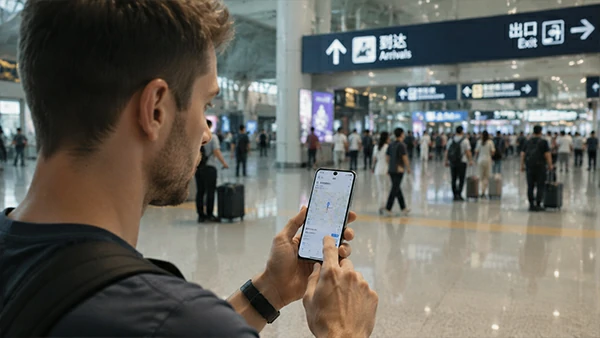
- Test maps, messaging, ride-hailing, and payment apps before leaving the airport.
A China eSIM can make the first hours of a trip much easier, but only when it is prepared properly. A few minutes spent checking compatibility, activation rules, and phone settings before departure can save far more time after landing.
The best China eSIM is not simply the plan with the largest data allowance. It is the one that matches your phone, travel route, internet needs, and backup plan.
Need Help Preparing for Your China Trip?
ChinaTravelAI provides practical support with visas, eSIM setup, payments, transport, bookings, travel apps, and other questions that often cause problems for first-time visitors.